
 Shopify
Pluginos Pay What You Want
Name your price, make offers and accept donations
Let customers choose their own price, make an offer, or donate. Set minimum, suggested and maximum prices, storewide or on selected products.
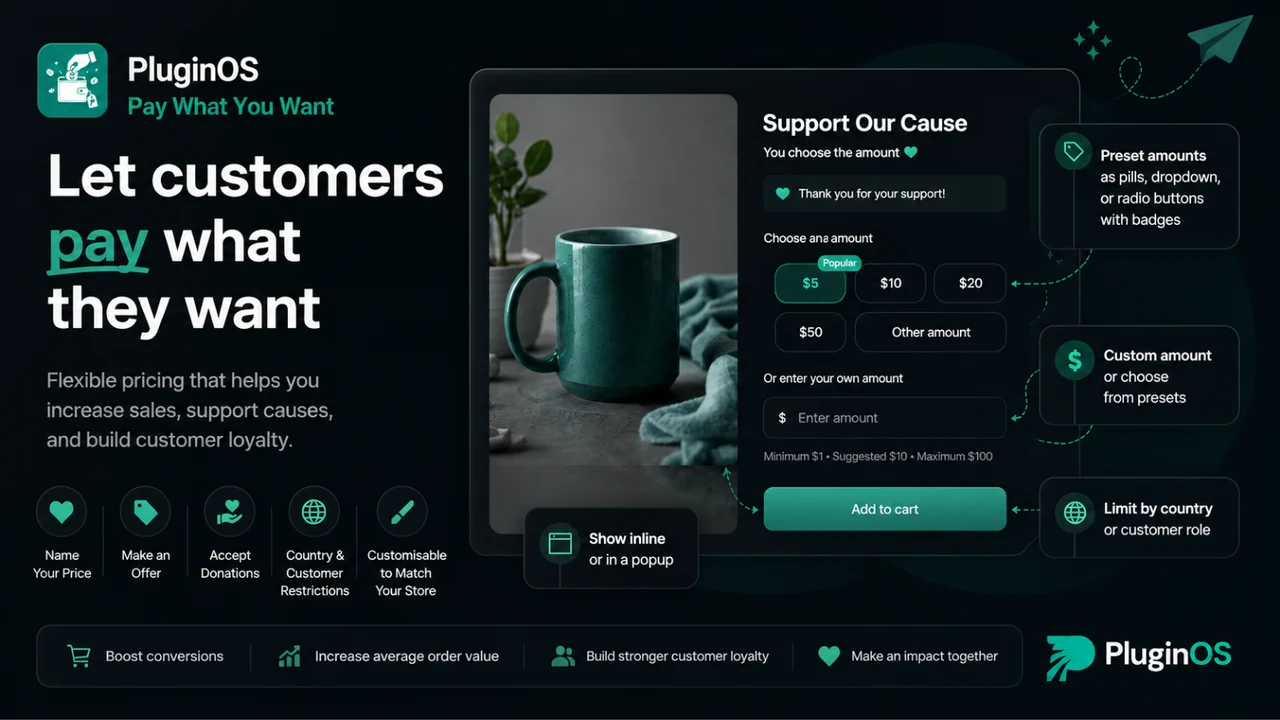
What Pluginos Pay What You Want does
Four pricing models
Pay what you want, name your price or make an offer, donations, and tips, all from one app.
Storewide or per product
Enable it across the store or limit it to a single collection, such as digital products or a charity line.
Custom or predefined amounts
Offer a free-entry field, a set of preset amounts, or both together.
Minimum, suggested and maximum
Set the guardrails directly, or calculate them from each product price so they stay correct as your catalogue changes.
Inline or popup display
Show pricing inline where the price is the proposition, or in a popup for optional tips and donations.
Flexible preset styles
Display predefined amounts as pills, a dropdown, or radio buttons with badges to suit your theme.
See it in action
Pluginos Pay What You Want lets customers choose their own price. It covers four models from one app: pay what you want, name your price or make an offer, donations, and tips.
Enable it storewide or on selected products. Offer a free-entry amount, a set of predefined amounts, or both, shown inline on the product page or in a popup.
Guardrails that protect your margin
Set minimum, suggested and maximum prices directly, or calculate them from each product's own price so the limits stay correct as your catalogue changes. The suggested amount acts as the anchor most customers adjust from, and the minimum keeps every order above the point where it is still worth fulfilling.
Donations and tips
Because contributions run through your normal Shopify checkout, you keep the order record, the customer details and your usual reporting instead of bolting on a separate donation tool.
Choose your plan
Frequently asked questions
Can Shopify do pay what you want natively?
No. Shopify prices products through fixed variants, so there is no built-in way for a customer to set their own amount.
Will customers just pay the minimum?
Some will, which is why the minimum should sit above the point where an order is still worth fulfilling. Most customers choose from the amounts you present, so the suggested price matters more than the floor.
Can I use it to collect donations?
Yes. A donation product with preset amounts works well, and because it runs through your normal checkout you keep the order record and customer details.
Can I enable it on only some products?
Yes, and usually you should. Enable it per product or per collection and leave the rest of your catalogue on fixed pricing.
Get more from Pluginos Pay What You Want

10+ Best Shopify Subscription Apps in 2026: Pricing & Features Compared
Compare the 10 best Shopify subscription apps in 2026, including Appstle, Recharge, Seal, and Shopify Subscriptions. Explore pricing, transaction fees, key features, and the best option for your store.
Sep 28, 2026 · 14 min read
Best Shopify Apps for Small Clothing Stores in 2026
A practical guide to sizing, virtual try-on, returns, reviews, social selling, inventory, bundles, retention and specialist pricing tools.
Sep 23, 2026 · 16 min read
Best Pay What You Want Shopify App
Looking for the best Pay What You Want Shopify app? Discover how Pluginos helps merchants offer customer-selected pricing, Name Your Price, preset amounts, pricing limits, contributions, and flexible pricing while maintaining control over how much customers can pay.
Sep 23, 2026 · 12 min read
Pay What You Want on Shopify: Name Your Price, Offers & Donations
Letting customers set the price sounds like a way to lose money. Used deliberately it raises average order value, clears dead stock and collects donations, if you get the floor and the anchor right.
Sep 17, 2026 · 8 min readQuestions about Pluginos Pay What You Want?
Talk to the developers who built it. We reply within 24 business hours.