
Social Media Automation 2026: The Complete Guide
Go beyond scheduling posts. Learn how to automate content, replies, and reporting with practical workflows, tools, and checklists while keeping people involved where it matters.

Oct 4, 2026 · 25 min read

Most teams automate the wrong end of social media. They schedule posts, which saves a little time, and leave untouched the work that actually eats the week: rewriting one idea for five platforms, answering the same questions in DMs, and building reports by hand.
This guide explains how to choose tasks to automate, build a workflow, use AI with review, select tools and measure results. It also explains where platform permissions and human judgement matter.
What is social media automation?
Social media automation is the use of software, rules and AI to carry out repeatable social media tasks, such as scheduling, publishing, repurposing, replying, routing and reporting, without doing each step by hand. A person still sets the strategy, approves anything risky and handles conversations that need judgement.
Automation is not the same as bots. Publishing your own content through a platform's native scheduler or an authorized integration is widely supported. Tools that fake human activity, such as mass following, bulk liking or scraped outreach, can violate platform rules and lead to restrictions. The exact limits differ by network.
How social media automation works
Every automation, simple or advanced, has the same three parts:
A trigger. Something happens: a set time arrives, a blog post is published, someone comments a keyword, a mention appears.
A rule or model. Software decides what to do. A rule is fixed ("if the comment contains PRICE, send the pricing DM"). An AI model is flexible ("draft a reply in our brand voice").
An action. A post goes out, a draft is created, a message is routed to a person, a row is added to a report.
The tools reach each network through its official API, the approved connection a platform offers to outside software. This matters in practice. A tool can only do what the API allows, which is why a feature may exist for Facebook but not for a personal LinkedIn profile, and why a tool that offers something the API does not is usually using a method the platform prohibits.
Why businesses use social media automation
Consistency. A queue keeps posting during holidays, launches and sick days.
Time moved to better work. Hours spent copying, pasting and resizing go to ideas and conversations.
Faster replies. Routing puts each message in front of the right person sooner.
Decisions from data. A report that builds itself gets read; one that takes two hours gets skipped.
Output without extra headcount. One source asset can feed every channel.
Automation does not fix weak content. It distributes whatever you give it, good or bad, more efficiently.
The five levels of social media automation
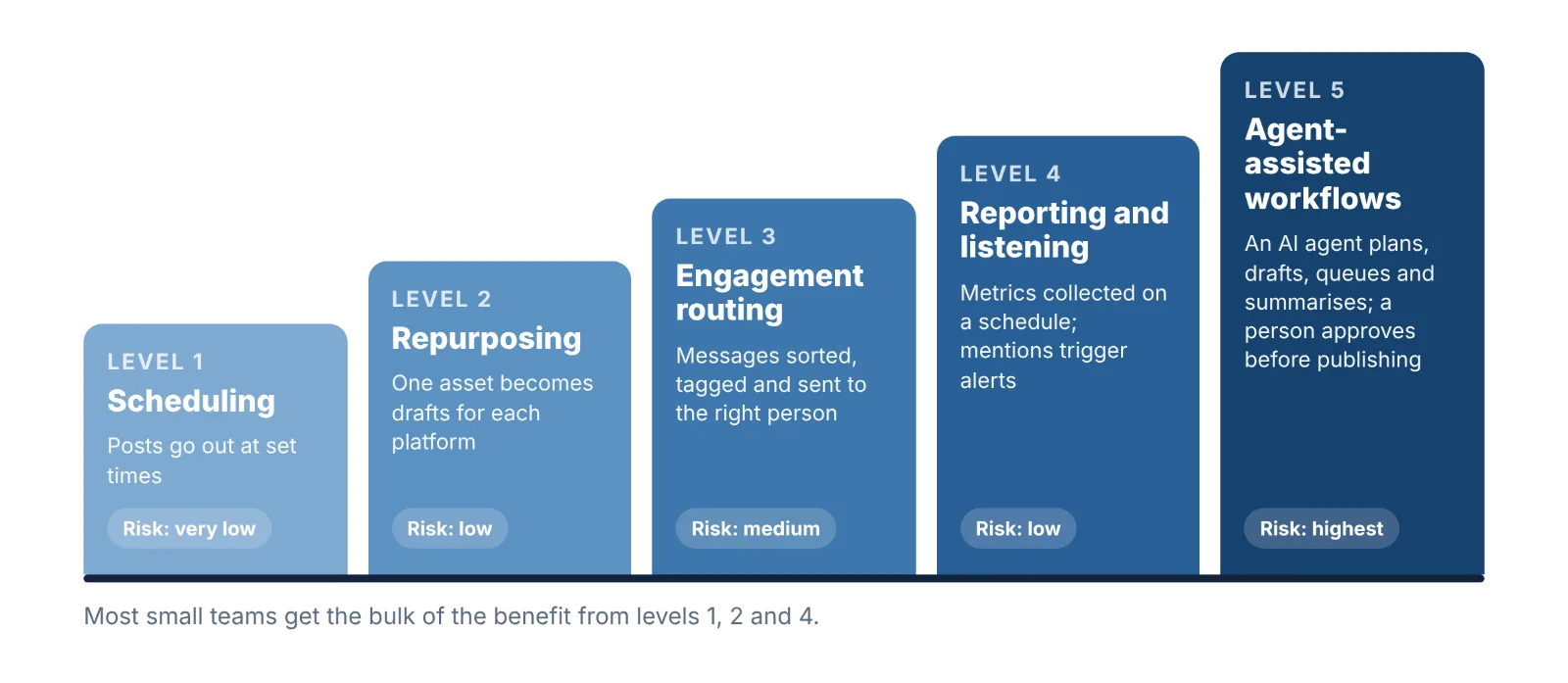
Use this model to see where you are and what to build next. Each level depends on the one before it.
Level | What is automated | Human role | Risk |
|---|---|---|---|
1. Scheduling | Posts go out at set times across channels | Writes and approves everything | Very low |
2. Repurposing | One source asset becomes drafts for each platform | Edits and approves drafts | Low |
3. Engagement routing | Comments and DMs are sorted, tagged and sent to the right person; FAQs get set replies | Handles anything unusual | Medium |
4. Reporting and listening | Metrics are collected on a schedule; mentions and keywords trigger alerts | Reads the report and decides | Low |
5. Agent-assisted workflows | An AI agent plans, drafts, queues and summarises across several tools | Approves before anything is published | Highest |
Most small teams get the bulk of the benefit from levels 1, 2 and 4. Level 3 pays off once message volume is high enough that replies are slow. Level 5 is worth it only when the first four are stable.
What to automate, what to review, and what to keep human
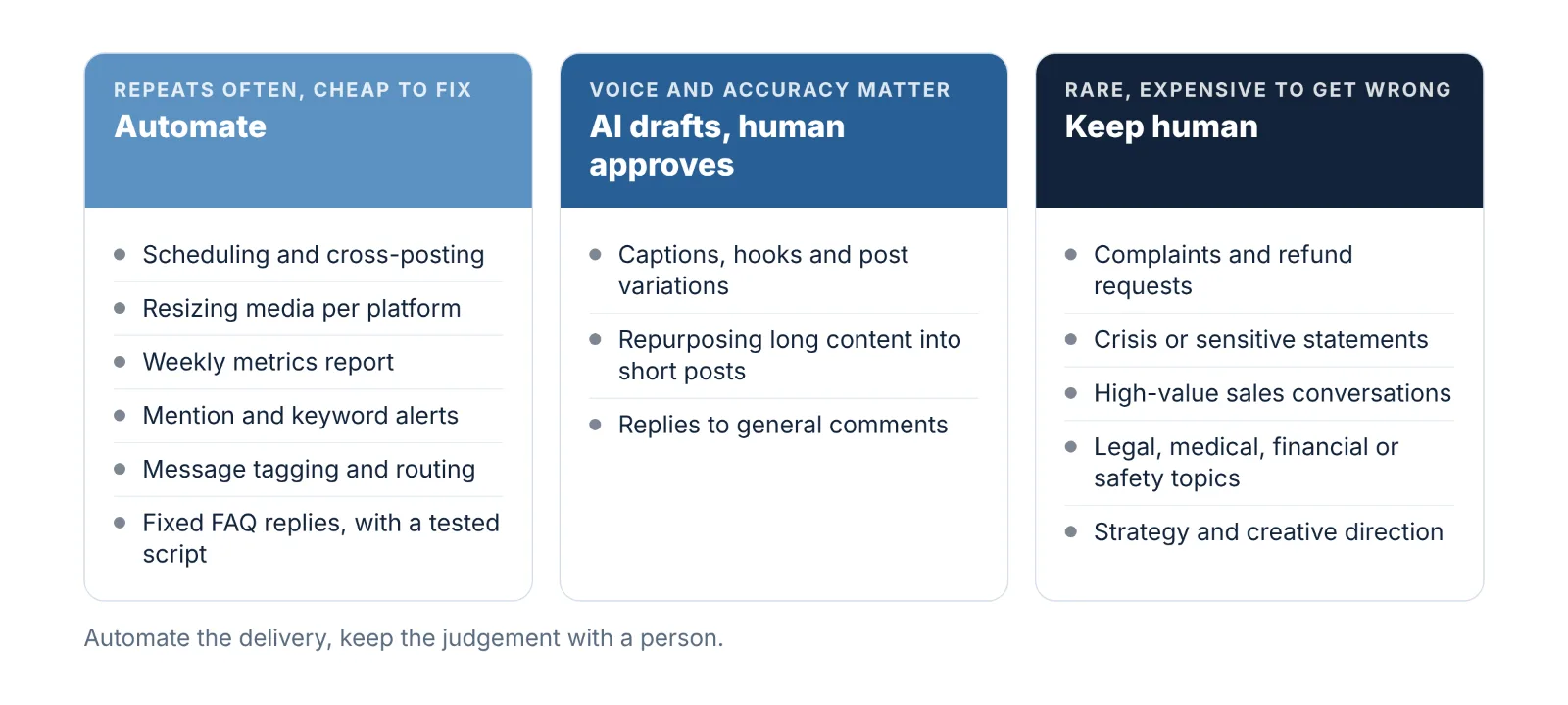
The test for any task is two questions: how often does it repeat, and what does a mistake cost? High repetition with a cheap mistake is safe to automate. Low repetition with an expensive mistake stays human.
Task | Decision | Why |
|---|---|---|
Scheduling and cross-posting approved content | Automate fully | Repeats daily; an error is easy to fix |
Resizing and reformatting media per platform | Automate fully | Mechanical work with clear rules |
Collecting metrics into a weekly report | Automate fully | Same steps every week |
Alerts for brand mentions and keywords | Automate fully | Software watches all day; people cannot |
Tagging and routing incoming messages | Automate with monitored routing rules | Speeds up the human reply |
Replies to fixed FAQs (hours, shipping, pricing link) | Automate with a tested script | Use maintained answers; review hours, shipping and pricing whenever they change |
Captions, hooks and post variations | AI drafts, human approves | Voice and accuracy need a check |
Repurposing long content into short posts | AI drafts, human approves | Context is easy to lose |
Replies to general comments | AI suggests, human sends | Tone decides how it lands |
Complaints and refund requests | Human | Frustrated people notice a script |
Crisis or sensitive public statements | Human | One wrong line spreads fast |
High-value sales conversations | Human | Trust is being built |
Legal, medical, financial or safety topics | Human | Errors carry real liability |
Strategy, positioning and creative direction | Human | This is the judgement automation serves |
Social media automation by platform: what is allowed
The table below is a starting point, not blanket permission. Check the account type, supported format, integration permissions and current platform policy before enabling a workflow.
Platform | Generally safe to automate | Needs care or is prohibited |
|---|---|---|
Scheduling feed posts, Reels and carousels from a professional (business or creator) account; keyword-triggered DM replies through approved messaging tools | Follow and unfollow bots, bulk liking and commenting, tools that ask for your password instead of an official login | |
Scheduling to Pages; Messenger auto-replies; comment moderation rules | Automating personal profiles; posting identical content across many groups | |
Scheduling to company pages and to your own profile through approved tools | Browser extensions that auto-connect, auto-message or scrape profiles; LinkedIn's rules prohibit these | |
X | Scheduling posts and threads; auto-posting your own content | Automated bulk following, liking or reposting; duplicate posts across accounts; unsolicited automated replies and mentions |
TikTok | Scheduling videos through native tools or approved partners | Engagement bots; publishing realistic AI-generated content without the required label |
YouTube | Scheduled publishing of videos and Shorts; saved replies and comment filters | Automated comment posting; failing to disclose realistic altered or synthetic content |
Scheduling Pins; publishing Pins automatically from your site's feed | High-volume repetitive pinning of the same link | |
Threads and Bluesky | Scheduling and cross-posting through tools that support them | Mass automated replies and follows |
Official documentation and policies to check before setup. Recheck them when requirements change.
Four rules that keep any account safe
Connect through the official login screen. If a tool asks you to type your social password into its own form, it is not using the approved connection.
Avoid unauthorized engagement automation. Check each platform's restrictions before enabling automated follows, likes, comments or unsolicited messages.
Adapt content to each platform's audience and format. Check network-specific rules on repetitive or duplicate posting.
Label AI-generated media where the platform requires it. Several major platforms now require disclosure for realistic synthetic images, video or audio.
How to automate Instagram posts
Use an Instagram professional (business or creator) account; the publishing API works only with professional accounts.
Connect your scheduler through the official Meta login screen.
Schedule images, videos, Reels and carousels. As of October 2026, Meta's documentation lists these formats and a limit of 100 API-published posts per account in 24 hours; recheck it before you rely on it.
Create posts that depend on app-only features in the Instagram app itself.
How to automate LinkedIn posts
Use LinkedIn's built-in post scheduling, or a tool that connects through LinkedIn's official login.
Schedule to the company page and to your own profile, with different copy for each.
Avoid browser extensions that send connection requests or messages for you.
Reply to comments yourself; on LinkedIn the conversation under a post is a large part of its value.
How to automate TikTok posts
Schedule finished videos with TikTok's own scheduler or an approved partner tool.
Add any in-app elements, such as trending audio, in the app before you schedule.
Label realistic AI-generated content, as TikTok's guidelines require.
Review the caption and cover image in the app before the scheduled time.
Does scheduling hurt reach?
Not by itself, as far as the platform policies linked above show: none describes a penalty for posts published through approved scheduling tools. If reach drops after you start scheduling, compare similar formats, topics and publishing times before blaming the tool. Then check content quality, audience activity and account restrictions, and make time to respond to comments.
Some features are still only available in the native apps, such as certain interactive stickers, trending audio and collaboration formats. Plan those posts by hand and automate the rest.
How to automate social media posts: a step-by-step workflow
Build one workflow at a time, in this order. Allow time for permissions, testing and any custom integrations.
Audit one normal week. Write down every social task, how long it took and how often it repeats. You will often find that a few tasks account for most of the hours.
Pick one workflow to automate first. Choose the task with the most hours and the lowest risk. For most teams this is scheduling or repurposing.
Set a baseline and a target. Record today's numbers: hours per week, posts per week, average reply time, and one result metric such as clicks or leads. Without a baseline you cannot prove the automation worked.
Fix the content system before the tool. Define three to five content pillars, a posting frequency you can sustain, and a voice guide with examples of good and bad posts. Automation needs these inputs.
Choose the tool for that workflow. Match it to the channels you use and the task you picked. The tools section below explains how.
Build it with an approval step. Every new workflow should create drafts for a person to approve. Remove the approval step only for tasks that have run cleanly for several weeks.
Test on one channel for two weeks. Check each output. Look for wrong formatting, broken links, mismatched images and off-brand tone.
Assign an owner and a pause procedure. One named person is responsible for the queue and knows how to stop everything in one step.
Review weekly, then expand. Compare against the baseline. When the first workflow is stable, add the next one.
Worked example: one blog post to a week of social content
This is the repurposing workflow most teams should build second, after basic scheduling.
Stage | What happens | Who does it |
|---|---|---|
Trigger | A new post appears in the blog's RSS feed | Automatic |
Draft | An AI step reads the post and writes a LinkedIn post, a short thread, an Instagram caption with a carousel outline, and a short video script | Automatic |
Store | Drafts land in a shared sheet or content calendar with status "Needs review" | Automatic |
Approve | An editor fixes facts, tone and hooks, and changes the status to "Approved" | Human, one short editing pass |
Queue | Approved rows are sent to the scheduler and spread across the week at chosen slots | Automatic |
First hour | Someone is online to reply to early comments when each post goes live | Human |
Report | Seven days later, results for each post are added to the same sheet | Automatic |
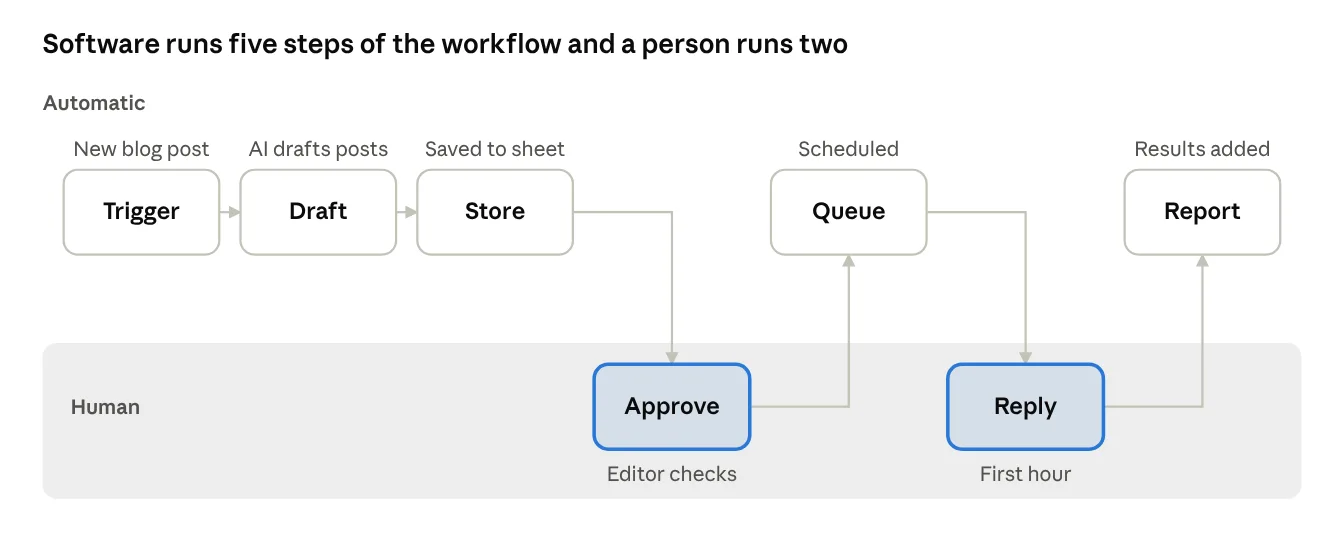
The two highlighted steps, the edit and the early replies, are the only ones a person does.
Why this works: the slow part of repurposing is the first draft and the copying between tools, and both are removed. The parts that decide quality, the edit and the early replies, stay with a person.
Where it fails: when the source post is thin, every draft is thin; when nobody edits, every platform gets the same paragraph with different hashtags.
If your blog runs on WordPress, our guide to automating a WordPress blog with n8n walks through this RSS-to-social step, including platform-specific copy for LinkedIn, X and Facebook.
AI social media automation in 2026
Rule-based automation handles volume. AI handles variation: tasks where the input is different each time, such as turning an article into a caption or sorting a message by intent. In 2026 the practical question is no longer whether to use AI, but which parts of the workflow it can be trusted with.
Where AI helps today
Drafting. Captions, hooks, thread structures and several variations of one idea.
Repurposing. Turning a long video, podcast or article into short posts and clip suggestions.
Adapting. Rewriting one message for the length, tone and format of each platform.
Triage. Sorting incoming comments and DMs by topic, urgency and sentiment so people see the important ones first.
Reply suggestions. Proposing an answer a person can approve or edit with one click.
Summaries. Turning a week of metrics into three plain sentences about what worked.
Localisation. First-pass translation and adaptation for other markets, checked by a native speaker.
The same drafting-with-review approach works for the source content itself; see our guide to AI blog automation for WordPress.
Where AI still fails
Facts. Models can state wrong prices, dates and product details with complete confidence. Anything factual must be checked against the source.
Voice drift. Without examples, output slides toward the same generic tone every brand's AI posts share.
Context. A model does not know there was a news event this morning that makes today's scheduled joke look careless.
Judgement about people. It cannot reliably tell a sarcastic compliment from a real one, or a joke from a complaint.
How to get on-brand AI drafts
Give the model the same brief you would give a new team member. This structure works with any AI assistant:
Role: Write social posts for [brand], which sells [product] to [audience].
Voice: [three adjectives]. Avoid [words or phrases].
Examples: [paste three posts you like].
Source: [paste the article, transcript or notes].
Task: Write one post for [platform], maximum [length].
Rules: Use only facts from the source. One idea per post. End with [call to action].
Output: Three variations with different opening lines.
The examples and the "only facts from the source" rule do most of the work. Keep the prompt in a shared document so every draft starts from the same brief.
AI agents: what they change
An AI agent is an assistant that can use tools on its own: read your content calendar, draft posts, add them to a scheduler, pull analytics and write the summary. More social tools now offer connections that let an assistant operate them directly, so one instruction such as "turn this week's webinar into a five-post sequence and queue it for review" can run across several apps.
Agents remove the hand-offs between tools, which is where most manual time goes. They also raise the stakes, because a mistake can now be published instead of merely drafted. Three guardrails make them safe to use:
Drafts only. Give the agent permission to create and queue drafts, and keep the publish action with a person.
Narrow access. Connect only the accounts and tools the task needs.
A log. Keep a record of what the agent did so problems can be traced.
Responsible automation
Be open about automated replies, and do not use AI to create fake reviews, fake accounts or invented testimonials. These are platform rules in most cases, and they are also what keeps an audience's trust.
Social media automation tools: categories and how to choose
No single tool does everything well. Think in categories, and add a category only when you have a workflow that needs it. The examples are well-known products in each category, not a ranking; features and prices change often, so confirm both on the vendor's site.
Category | Problem it solves | Who needs it | Examples |
|---|---|---|---|
Schedulers | Posting by hand on several networks | Everyone; this is the starting point | |
Management suites | Publishing, inbox, approvals and reporting for a team | Teams of three or more, agencies, regulated brands | |
Conversation and DM automation | High volumes of repeated questions and lead capture in messages | E-commerce, service businesses, anyone running comment-to-DM campaigns | |
Workflow builders | Moving data between tools that do not connect | Anyone building repurposing or reporting workflows | |
AI assistants | First drafts, repurposing and summaries | Everyone, with human review | |
Repurposing and clipping | Cutting long video or audio into short clips | Video-led brands, podcasters | |
Listening and monitoring | Missing mentions, trends and early signs of a problem | Larger brands, reputation-sensitive sectors |
Free social media automation tools are a valid first choice. Meta Business Suite, TikTok's scheduler, YouTube Studio and Pinterest's scheduler are free and usually support each platform's newest features first. Their limit is that each covers only its own network.
How to choose a social media automation tool: seven questions
Does it support every channel and format you post? Check the specific formats, such as Reels, carousels, threads and Shorts, not just the network name.
Does it connect through the official login? If not, stop there.
Does it cover the workflow you are automating? A scheduler will not solve a slow inbox.
Is there an approval step? You need one as soon as two people or any AI drafting is involved.
How does the price grow? Look at the cost per channel and per user, because that is where bills climb.
Can you get your data out? Exportable reports and an API or workflow-builder connection keep you from being locked in.
Can you test it properly? Run one real week of content through a trial before paying for a year.
Social media automation for small business, agencies and larger teams
Team | Stack | First workflow to build |
|---|---|---|
Solo creator | Native schedulers or one low-cost scheduler, plus an AI assistant | A weekly batch: write once, schedule the week |
Small business | One scheduler with an inbox, an AI assistant, a simple FAQ auto-reply | Scheduling, then saved replies for the five most common questions |
E-commerce brand | Scheduler, DM automation, workflow builder linked to the store | Comment-to-DM product replies with a hand-off to a person |
Agency | Management suite with client workspaces and approvals, workflow builder, automated client reports | Client approval flow and scheduled reporting |
B2B company | Scheduler for the company page and leaders' profiles, AI assistant, workflow builder linked to the CRM | Repurposing long content into leaders' posts |
When to pay for more: upgrade from a scheduler to a suite when replies are being missed across inboxes, when more than two people need to approve content, or when building reports by hand takes more than an hour a week.
Four automation workflows you can copy
Each example follows the same pattern: a trigger, automated steps, and a clear point where a person takes over.
Local service business: the weekly batch
On Monday, spend one hour writing five posts from a fixed weekly pattern: a tip, a finished job, a customer question, a team photo, an offer.
An AI assistant adapts each post for Facebook, Instagram and the Google Business Profile.
The scheduler queues the week.
Saved replies answer opening hours, service area and booking questions; everything else goes to the owner's phone.
Human hand-off: quotes, complaints and anything about a specific job.
E-commerce brand: comment to DM to sale
A product post invites people to comment a keyword for the link or a size guide.
A DM flow sends the answer at once and asks one qualifying question.
The contact is tagged with the product they asked about.
Questions outside the script are routed to a person with the conversation history attached.
Human hand-off: order problems, returns and any message with negative sentiment.
B2B company: one webinar, one month of posts
The webinar recording is transcribed automatically.
An AI step extracts the ten strongest points and drafts posts for the company page and for two leaders' profiles, each in that person's voice.
A clipping tool suggests short video segments.
Each leader approves their own posts before they are queued.
Human hand-off: every post under a named person's profile, and all comment replies.
Agency: approvals and reporting
Content for each client is drafted into a shared calendar.
The client gets an automatic request to approve, with a deadline.
Approved posts are queued; unapproved posts trigger a reminder, never an automatic publish.
A report for each client is generated and sent on the first working day of the month, with a short written summary added by the account manager.
Human hand-off: the summary and recommendations, which are what the client is paying for.
How to measure the ROI of social media automation
Automation pays back in two ways: time you no longer spend, and results you would not otherwise have had. Measure both against the baseline you recorded before you started.
Monthly net value = (hours saved × hourly cost) + added revenue − tool cost − (upkeep hours × hourly cost)
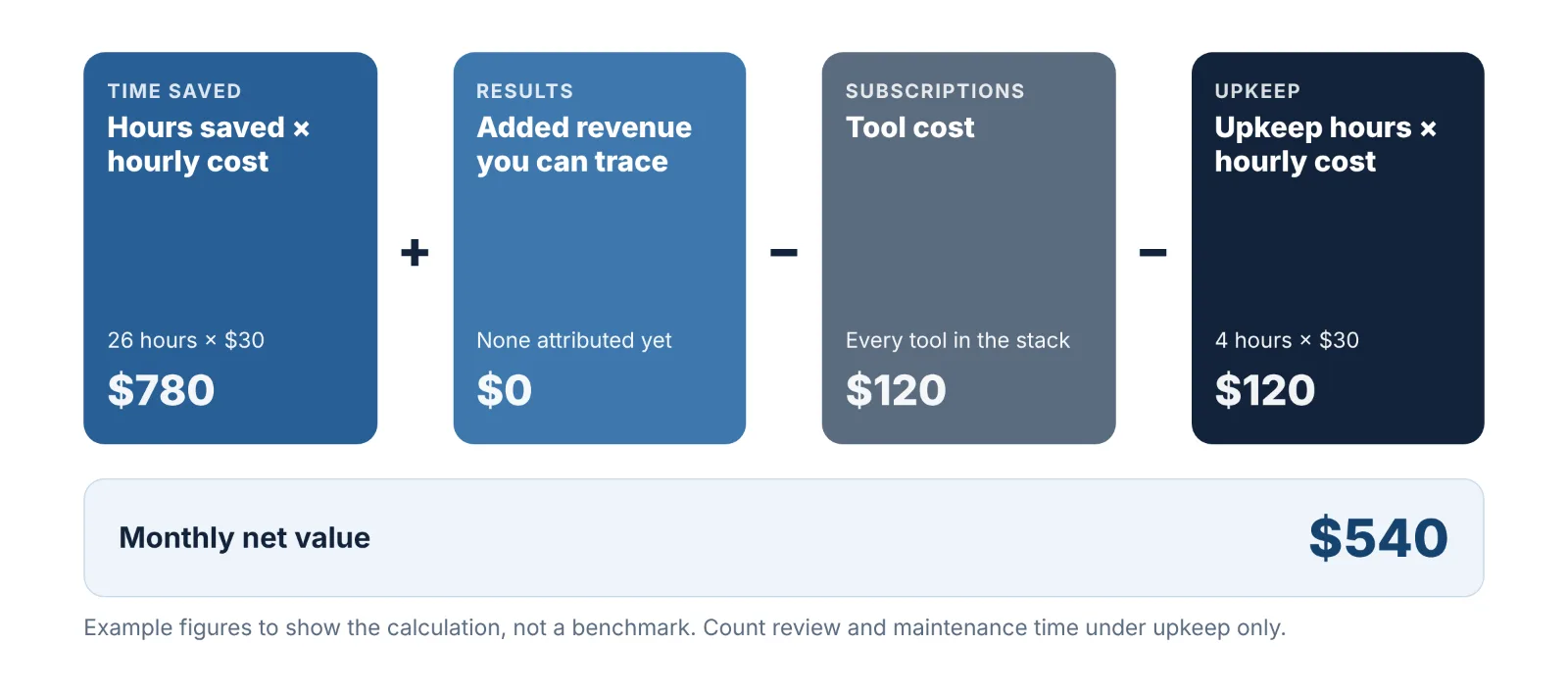
Hours saved is the baseline task time minus the remaining task time. Count draft review, maintenance and failure handling under upkeep only, so those hours are not counted twice.
Hourly cost is the loaded cost of the person doing the work.
Added revenue is revenue you can trace to social through tracked links or your CRM. If you cannot attribute it, leave it at zero.
Tool cost is every subscription in the stack.
Upkeep hours is the time spent reviewing drafts, fixing failures and maintaining workflows. People often leave this out, which makes automation look better than it is.
Illustrative example. A two-person team saves 6 hours a week, about 26 hours a month. At a loaded cost of $30 an hour, that is $780. Tools cost $120 a month and upkeep takes 4 hours ($120). With no attributed revenue, the net value is $780 − $120 − $120 = $540 a month. These numbers are an example to show the calculation, not a benchmark.
Metrics to track
Metric | What it tells you | Check |
|---|---|---|
Hours spent on social tasks | Whether time was actually saved | Monthly |
Posts published against plan | Whether consistency improved | Weekly |
Median first reply time | Whether routing is working | Weekly |
Engagement rate per post | Whether quality held as volume rose | Weekly |
Clicks, leads or sales from social | Whether the activity produces results | Monthly |
Share of AI drafts approved without major edits | Whether your prompts and voice guide are good enough | Monthly |
Failed or corrected posts | Whether the workflow is reliable | Monthly |
The important comparison is engagement per post before and after. If hours fall and engagement per post holds, the automation is working. If engagement per post falls, you are publishing more of something people want less of, and the fix is in the content, not the tool.
Common mistakes, risks and how to fix them
Five mistakes that undo the benefit
Set and forget. A queue built in January is still posting in March, after the offer ended. Review the queue weekly.
Skipping the human steps. Unedited AI drafts, identical cross-posts and unanswered comments are the most common ways automation backfires.
Automating replies to upset people. A scripted answer to a complaint makes it worse and happens in public.
More volume as the goal. Automation makes it easy to post more. More is only better if each post still earns attention.
Buying the tool before defining the workflow. The result is a paid subscription used as a basic scheduler.
Bad timing: why every team needs a pause procedure
A cheerful scheduled post that goes out during a tragedy, an outage or a brand crisis looks careless. Every team that automates needs a pause procedure:
One person owns the decision to pause.
Everyone knows where the "pause all" control is in each tool.
The queue is checked before it is switched back on, since posts written before the event may no longer be appropriate.
Troubleshooting common automation problems
Problem | Likely cause | Fix |
|---|---|---|
A scheduled post did not publish | The account connection expired, or the media did not meet the platform's format rules | Reconnect the account; check size, length and aspect ratio; turn on failure alerts |
Reach dropped after you started scheduling | Identical cross-posts, no early replies, or a change in content mix at the same time | Adapt posts per platform; be present after publishing; compare like-for-like post types |
Posts sound robotic | AI drafts with no examples or editing | Add real examples to the prompt; restore the approval step |
The account was restricted | A tool using an unofficial method, or automated engagement | Disconnect the tool, change the password, follow the platform's appeal process, and use approved tools only |
Auto-replies fire on the wrong messages | Keyword triggers that are too broad | Use specific phrases, add exclusions, and route anything uncertain to a person |
Duplicate posts appeared | Two workflows triggered by the same event | Give each trigger one owner workflow and add a "posted" status check |
The team stopped trusting the system | Too many small failures with no clear owner | Name an owner, log each failure and fix the most frequent one first |
Templates and checklists
Automation audit checklist
Run this before you automate anything.
List every social task done in a normal week
Record the time each task takes and how often it repeats
Mark each task as automate, AI draft with review, or human
Record baseline numbers: hours, posts, reply time, one result metric
Choose the single workflow with the most hours and lowest risk
Name the owner of that workflow
Pre-launch checklist for any new workflow
The tool connects through the platform's official login
An approval step exists before anything is published
Outputs were checked on one channel for two weeks
Failure alerts are switched on
The pause procedure is written down and tested
AI-generated media is labelled where required
Weekly content calendar template
Day | Pillar | Format | Source asset | Platforms | Status |
|---|---|---|---|---|---|
Monday | Education | Carousel | Blog post | Instagram, LinkedIn | Draft |
Tuesday | Proof | Short video | Customer story | TikTok, Reels, Shorts | Draft |
Wednesday | Opinion | Text post | Founder notes | LinkedIn, X, Threads | Draft |
Thursday | Product | Image | Product update | Instagram, Facebook | Draft |
Friday | Community | Question | Customer comments | All | Draft |
Keep one or two slots a week empty for timely posts. A calendar that is completely full has no room to react.
Auto-reply templates
Good automated replies say what they are, answer the question and offer a person.
FAQ reply
Hi [name], thanks for asking. [Direct answer in one sentence.] Here is the link: [link].
Reply HELP if you would like to talk to someone on our team.
Out-of-hours reply
Thanks for your message. This is an automatic reply because we are offline until [time].
A person will answer you then. For an order question, please send your order number.
Hand-off reply
I am passing this to [team or name].
You will hear back by [time].
Is social media automation worth it?
It can be worthwhile when repeatable tasks consume enough time to justify setup and upkeep. Use this quick test:
Automate now if you post on two or more channels weekly, repeat the same manual steps each time, or miss posting days when you are busy.
Fix the content first if you do not yet know what your audience responds to. Automating guesses produces more guesses.
Stay manual for now if you post occasionally on one channel. A native scheduler is all you need.
Frequently asked questions
What is the first thing I should automate?
Scheduling. It is the lowest-risk task and the quickest to set up. Repurposing one source asset into several posts is the best second step.
Can social media be fully automated?
Publishing and reporting can run with very little attention. Strategy, creative direction, complaints and relationship-building cannot. Accounts run entirely on autopilot risk losing engagement because nobody is replying.
Is social media automation against platform rules?
No, not when you publish your own content through native tools or authorized integrations. Engagement automation has additional restrictions that vary by platform, so check the current policy and integration permissions before enabling follows, likes, comments or messages.
How much does social media automation cost?
It ranges from nothing, using each platform's native scheduler, to enterprise suites priced per user. Most small teams need one scheduler and one AI assistant. Compare the price per channel and per user, since that is how costs grow.
Will AI-written posts hurt my brand?
Unedited ones can, because they tend to be generic and sometimes wrong. AI drafts that are briefed with real examples and edited by a person can read as naturally as hand-written posts and take less time to produce.
How long does it take to set up?
These are rough estimates and yours will vary. Basic scheduling can be set up in about an hour. A repurposing workflow with an approval step typically takes about a day to build, plus around two weeks of checking before you can trust it. Message automation takes longer because the reply scripts need testing against real conversations.
How often should I review automated workflows?
Check the queue and the results weekly. Review the workflow itself, including triggers, prompts and reply scripts, every quarter or whenever a platform changes its features or rules.
Do I need technical skills?
No. Schedulers and most DM tools are built for non-technical users, and workflow builders use visual steps instead of code. The skill that matters is describing your process clearly.
Conclusion: start with one workflow
Start with an audit of one week and choose one repetitive task to automate. Keep human review where mistakes affect customers or your reputation, and measure the result against your baseline.
Do that once, and each later workflow becomes easier to add. The teams that get the most from automation in 2026 are the ones that use the time it frees to make better content and have better conversations.
For more step-by-step builds, browse our automation guides. If you need a workflow built around your own setup, the Pluginos team can help through its custom services.
Written by
Pluginos
Pluginos is a WordPress, WooCommerce, and Shopify development team with 8+ years of experience building plugins, apps, and eCommerce solutions. We share practical tutorials and insights based on hands-on development experience.
Related articles

What Is Super Intelligence (SI)? AI vs SI vs ASI Explained
AI just got a new name, but your chatbot didn't get any smarter. Here's what "super intelligence" (SI) really means, how it differs from true superintelligence, and what it changes for your business.
Oct 1, 2026 · 12 min read
Automate a WordPress Blog with n8n: Step-by-Step Guide (2026)
A complete step-by-step guide to automating your WordPress blog with n8n. Connect the REST API, generate AI drafts, add featured images, and review before you publish.
Sep 30, 2026 · 19 min read
WordPress Blog Automation With AI: 6 Ways to Create, Review, and Publish Posts
Automate your WordPress blog with AI using six practical methods, from the editor and plugins to n8n and Zapier. Learn how to create drafts, review content, and publish with confidence.
Sep 28, 2026 · 13 min read